1. Export a CSV marker file from Pix
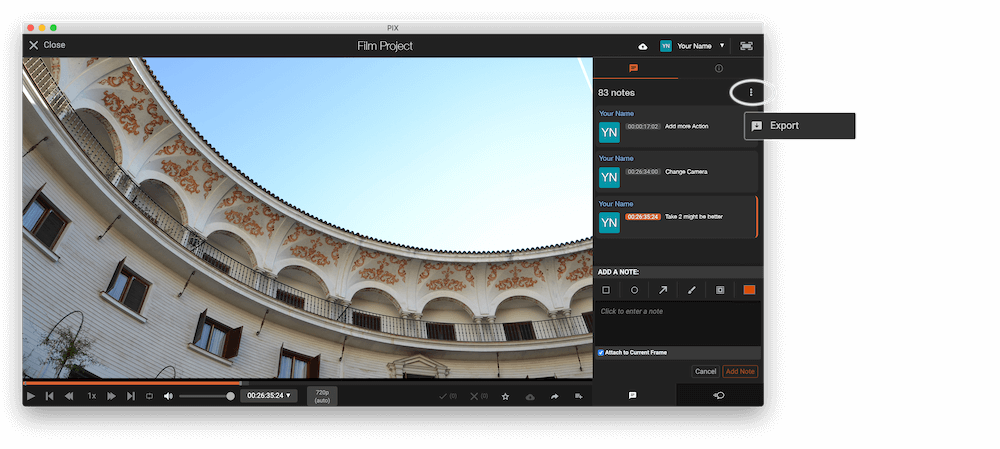
Open the comments panel on the right side in Pix. Press the three dots and select "Export". Now you can then download the CSV file from Pix.
2. Use the "Marker Konverter" to convert the CSV marker file into a SRT subtitle file
Open the free Marker Konverter, select "Pix Systems > Comments (.csv)" and set "convert" to "SRT". Generate and download the file. Wenn du Probleme beim Konvertieren der Datei hast, kannst du dich an den kostenlosen Support wenden.
3. Use the "Untertitel Tool & Konverter" to convert the SRT subtitle file into an ASS subtitle file
Open the free Untertitel Tool & Konverter, select "SRT" and set "convert" to "ASS". Generate and download the file. Wenn du Probleme beim Konvertieren der Datei hast, kannst du dich an den kostenlosen Support wenden.
🚀 Fertig
Das war's fürs Erste! Wenn du dieses Tutorial hilfreich fandest, teile es bitte, um uns zu unterstützen. Wenn du Vorschläge hast, wie wir den Workflow verbessern könnten, lass es uns wissen!