1. Export a SRT subtitle file from Adobe Premiere Pro
Open the sequence in Premiere Pro and go to File > Export > "Captions". Choose "SubRip Subtitle Format (.srt)" from the export window.
2. Use the "Untertitel Tool & Konverter" to convert the SRT subtitle file into a CSV file
Open the free Untertitel Tool & Konverter, select "SRT" and set "convert" to "CSV for Google Sheets". Generate and download the file. Wenn du Probleme beim Konvertieren der Datei hast, kannst du dich an den kostenlosen Support wenden.
3. Import the CSV file into Google Sheets
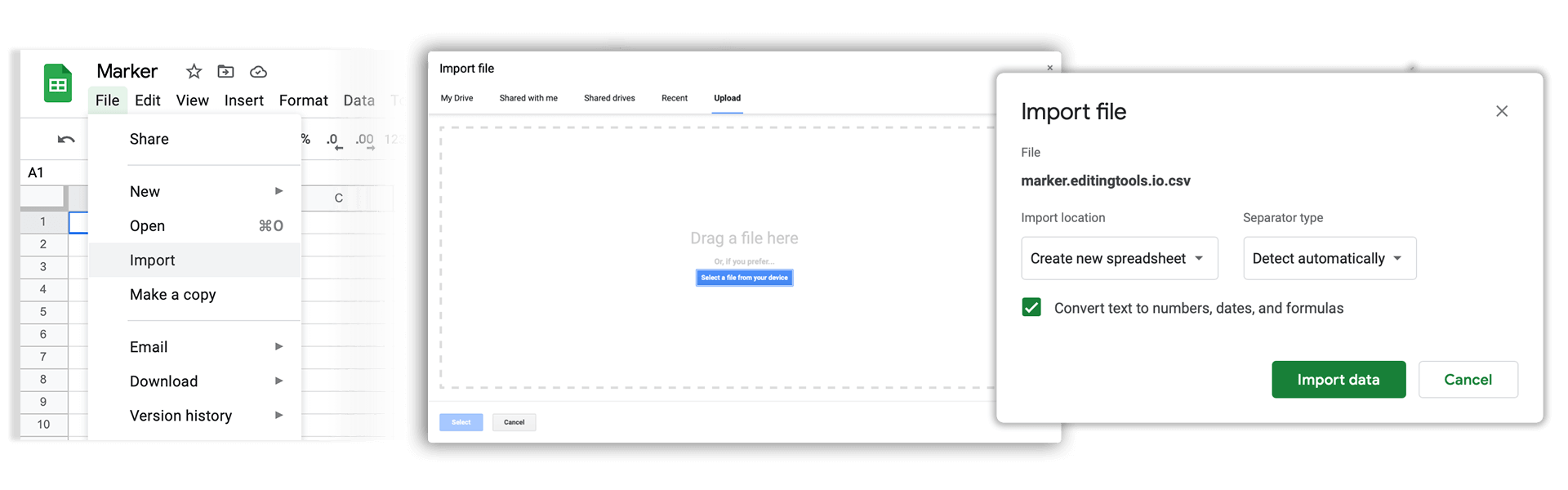
Open Google Sheets and go to "File -> Import". Upload the generated CSV file and press "Import Data" to generate the Sheet with all markers.
🚀 Fertig
Das war's fürs Erste! Wenn du dieses Tutorial hilfreich fandest, teile es bitte, um uns zu unterstützen. Wenn du Vorschläge hast, wie wir den Workflow verbessern könnten, lass es uns wissen!